How to setup Quality Profiles Anime
aka How to set up Custom Formats (Anime)
Warning
You must be running Sonarr V4 to be able to use this setup.

Note
This guide is created and maintained by FonduemangVI and rg9400
This guide aims to grab the best release overall (as per SeaDex) and not necessarily just dual audio. The vast majority of releases can be found on Nyaa
Media Management
Series Type
When adding a new series make sure you set the series type to Anime
example - [Click to show/hide]

Recommended naming scheme
{Series TitleYear} - S{season:00}E{episode:00} - {absolute:000} - {Episode CleanTitle:90} {[Custom Formats]}{[Quality Full]}{[Mediainfo AudioCodec}{ Mediainfo AudioChannels]}{MediaInfo AudioLanguages}{[MediaInfo VideoDynamicRangeType]}[{Mediainfo VideoCodec }{MediaInfo VideoBitDepth}bit]{-Release Group}
Results: - [Click to show/hide]
Single Episode:
The Series Title! (2010) - S01E01 - 001 - Episode Title 1 [Surround Sound x264 HDTV-720p v2][10bit][AVC][DTS 5.1][JA]-RlsGrp
Multi Episode:
The Series Title! (2010) - S01E01-E03 - 001-003 - Episode Title [Surround Sound x264 HDTV-720p v2][10bit][AVC][DTS 5.1][JA]-RlsGrp
Series Folder Format
Result:
The Series Title! (2010)
Season Folder Format
Result:
Season 01
Multi-Episode Style
Result:

Quality Settings
For quality settings please refer to Sonarr Quality Definitions - Anime
If you are only running a single instance of Sonarr you can instead use Sonarr Quality Definitions
Quality Profile
We need to create a new profile called [Anime] Remux-1080p due to the way anime can be named we will need to merge a few qualities - see here for an example.
We need to add Bluray-1080p Remux and Bluray-1080p into a group together, HDTV-1080p into the same group as WEBDL-1080p and WEBRip-1080p, and HDTV-720p into the same group as WEBDL-720p and WEBRip-720p so that the scoring will work correctly.
Go to Settings => Profiles


We then need to select and organize the qualities as seen below.

Anime CF/Scoring
Note
We're going to make use of the below custom formats. See How to import Custom Formats for how to import them.
Default Scoring
Anime CF/Scoring - [Click to show/hide]
| Custom Format | Score | Trash ID |
|---|---|---|
| Anime BD Tier 01 | 1400 | 949c16fe0a8147f50ba82cc2df9411c9 |
| Anime BD Tier 02 | 1300 | ed7f1e315e000aef424a58517fa48727 |
| Anime BD Tier 03 | 1200 | 096e406c92baa713da4a72d88030b815 |
| Anime BD Tier 04 | 1100 | 30feba9da3030c5ed1e0f7d610bcadc4 |
| Anime BD Tier 05 | 1000 | 545a76b14ddc349b8b185a6344e28b04 |
| Anime BD Tier 06 | 900 | 25d2afecab632b1582eaf03b63055f72 |
| Anime BD Tier 07 | 800 | 0329044e3d9137b08502a9f84a7e58db |
| Anime BD Tier 08 | 700 | c81bbfb47fed3d5a3ad027d077f889de |
| Anime Web Tier 01 | 600 | e0014372773c8f0e1bef8824f00c7dc4 |
| Anime Web Tier 02 | 500 | 19180499de5ef2b84b6ec59aae444696 |
| Anime Web Tier 03 | 400 | c27f2ae6a4e82373b0f1da094e2489ad |
| Remux Tier 01 |  975 975 |
9965a052eb87b0d10313b1cea89eb451 |
| Remux Tier 02 | 950 |
8a1d0c3d7497e741736761a1da866a2e |
| Anime Web Tier 04 | 300 | 4fd5528a3a8024e6b49f9c67053ea5f3 |
| Anime Web Tier 05 | 200 | 29c2a13d091144f63307e4a8ce963a39 |
| Anime Web Tier 06 | 100 | dc262f88d74c651b12e9d90b39f6c753 |
| Anime Raws | -10000 | b4a1b3d705159cdca36d71e57ca86871 |
| Anime LQ Groups | -10000 | e3515e519f3b1360cbfc17651944354c |
| AV1 | -10000 | 15a05bc7c1a36e2b57fd628f8977e2fc |
| Uncensored | 0 | 026d5aadd1a6b4e550b134cb6c72b3ca |
| v0 | -51 | d2d7b8a9d39413da5f44054080e028a3 |
| v1 | 1 | 273bd326df95955e1b6c26527d1df89b |
| v2 | 2 | 228b8ee9aa0a609463efca874524a6b8 |
| v3 | 3 | 0e5833d3af2cc5fa96a0c29cd4477feb |
| v4 | 4 | 4fc15eeb8f2f9a749f918217d4234ad8 |
| 10bit | 0 | b2550eb333d27b75833e25b8c2557b38 |
| Anime Dual Audio | 0 | 418f50b10f1907201b6cfdf881f467b7 |
| Dubs Only | -10000 | 9c14d194486c4014d422adc64092d794 |
| VOSTFR | -10000 | 07a32f77690263bb9fda1842db7e273f |
Scores marked with a warning are different to those used in the main guide
Anime Streaming Services - [Click to show/hide]
| Custom Format | Score | Trash ID |
|---|---|---|
| CR | 6 | 3e0b26604165f463f3e8e192261e7284 |
| DSNP | 5 | 89358767a60cc28783cdc3d0be9388a4 |
| NF | 4 | d34870697c9db575f17700212167be23 |
| AMZN | 3 | d660701077794679fd59e8bdf4ce3a29 |
| VRV | 3 | 44a8ee6403071dd7b8a3a8dd3fe8cb20 |
| FUNi | 2 | 1284d18e693de8efe0fe7d6b3e0b9170 |
| ABEMA | 1 | a370d974bc7b80374de1d9ba7519760b |
| ADN | 1 | d54cd2bf1326287275b56bccedb72ee2 |
| B-Global | 0 | 7dd31f3dee6d2ef8eeaa156e23c3857e |
| Bilibili | 0 | 4c67ff059210182b59cdd41697b8cb08 |
| HIDIVE | 0 | 570b03b3145a25011bf073274a407259 |
The scoring that has been set is the recommended scoring, however, some of the CFs are optional depending on what you prefer.
Anime Dual Audio, Uncensored and 10bit can be given positive scores if you want to prefer content with these attributes.
Anime Raws and Dubs Only are negatively scored, however, if you prefer these attributes you can give them a positive score.
Once the custom formats have been imported you can set the scores as above. To do this go to Settings => Profiles and select the [Anime] Remux-1080p profile that was set up before.
In the profile enter the scores as per the above table in this section.

After you are done it should look similar to the image above, but using the current Guide Scores from the above tables.
Dual Audio Scoring
If you prefer Dual Audio releases you have a few options depending on your preference.
If you want to prefer Dual Audio within the same tier give the CF a score of 10, if you want it to be preferred a tier above give the CF a score of 101, and if you want to prefer it over any tiers give the CF a score of 2000.
If you must have Dual Audio releases set the Minimum Custom Format Score to 2000 in the [Anime] Remux-1080p profile that you set up earlier.
Using this scoring you will still benefit from the tiers if a better release group does a Dual Audio release.
Below is an example of the scoring set to prefer Dual Audio over any tier.

Uncensored Scoring
Note
Most BDs are uncensored by default, so most groups do not include that in the name.
If you prefer Uncensored releases you have a few options depending on your preference.
If you want to prefer Uncensored within the same tier give the CF a score of 10, if you want it to be preferred a tier above give the CF a score of 101.
Using this scoring you will still benefit from the tiers if a better release group does an Uncensored release.
Below is an example of the scoring set to prefer Uncensored a tier above.

Finishing up
Once you have set your preferred scoring you will need to make one more change to your [Anime] Remux-1080p profile.
Make sure Upgrades Allowed is ticked then set the Upgrade Until section to Bluray-1080p and the Upgrade Until Custom Format Score to 10000
After this has been done your profile should look as seen below. This is an example of the Default Scoring setup.

FAQ
Is this guide meant for backfilling my library?
No. This guide is designed to grab the best available releases going forward, not for backfilling an existing library. Backfilling would require manual intervention and searching to find older releases.
Why is Sonarr search running slow for anime?
Sonarr searches for anime using both absolute episode numbers and season/episode numbers. This dual search method can cause slower search times compared to regular TV shows, especially on indexers with large anime databases.
Why are there no English subtitles available for some anime?
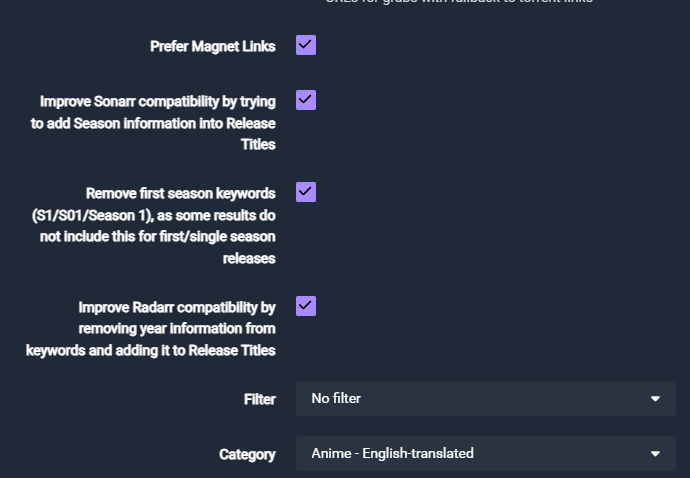
Not all anime releases include English subtitles. If you want to filter for only releases with English subtitles, or if you prefer raw (no subs) releases, you can configure this in Prowlarr.
Go to Indexers => Select your anime indexer => and look for the Anime English-Translated category option.
How do I configure this for no Remuxes?
If you don't want Remuxes, you can simply remove Bluray-1080p Remux from your quality profile or uncheck it in the qualities list. The guide will then prefer the highest-scoring encodes instead.
How do I set up a WEB-only profile?
If you only want WEB releases (no Bluray encodes or Remuxes), create a quality profile that only includes WEBDL-1080p, WEBRip-1080p, WEBDL-720p, and WEBRip-720p. The Anime Web Tier custom formats will still score these releases appropriately.
Why are some raw releases showing up as Dual Audio?
Some groups like ToonsHub and VARYG release raw anime (no English audio/subs) but their naming conventions can cause them to be incorrectly detected as Dual Audio. If you encounter this, you may need to use the Uncensored custom format to help differentiate these releases.
Should I run a single instance or dual instances?
It's recommended to run two Sonarr instances (one for Anime and one for regular TV shows). This allows you to have completely separate quality profiles, custom formats, and settings optimised for each type of content without conflicts. However, if you prefer a single instance, you can create separate quality profiles and assign series accordingly.
Acknowledgements
Most of my information and knowledge came from:
-
rg9400 (Building the Custom Formats, Guidance on anime groups and sharing general knowledge.)
-
V01 from SeaDex (Guidance on anime groups and sharing general knowledge.)
-
Drazzilb (Guidance on anime groups, testing and sharing general knowledge.)
-
TRaSH (For allowing me to utilize his website for our guide and sharing general knowledge.)
Questions or Suggestions?
